
My First Homelab (for the second attempt)
This homelab is the first real infrastructure I’m building—although technically, it’s already my second attempt.
Why a Second Attempt?
The first time I tried to set everything up, I used Proxmox running on a VM provider and Talos Linux for my Kubernetes nodes. I experimented with countless configurations, trying to understand how Talos works behind the scenes. Each time a node failed or something didn’t behave the way I expected, I had to rebuild everything manually, one node at a time. It was painful, slow, and sometimes discouraging… but I learned a lot from it.
During that phase, I also tried to rely on custom Docker containers to install all the tools needed for Talos initialization and management. The idea was good, but the setup quickly became messy and difficult to maintain.
Taking a Step Back
At some point—because of work and personal life—I stopped the whole project. Honestly, I was a bit discouraged. Weeks passed, and then I decided to restart with a new mindset: dedicate one hour a day, even if the progress seemed small. That rhythm helped me move forward without pressure.
Around the same time, I found an inspiring video from an engineer explaining how he manages multiple IT projects without creating chaos on his machine. I was shocked by how simple tools could completely transform a workflow and make everything cleaner and more efficient.
New Tools, New Approach
After watching that video, I knew exactly where I needed to start. I discovered a collection of tools and practices that completely reshaped how I organize my development environment: • Devcontainer – A way to create isolated development environments that contain everything needed to build and run a project. No more polluting my local system. • DevPod – A manager for devcontainers that makes setup and usage even simpler across projects. • Dotfiles – Not a tool, but an essential practice. Centralized configuration for shells, tools, and environments that I can sync across machines. It instantly makes any new system feel like home. • Pulumi – An IaC (Infrastructure as Code) tool that supports multiple languages. Since I code a lot in Python, it felt more natural than switching to Terraform syntax. And interestingly, many Pulumi providers are built on top of Terraform ones.
Homelab V0 vs Homelab V1 — A Cleaner, Smarter Workflow
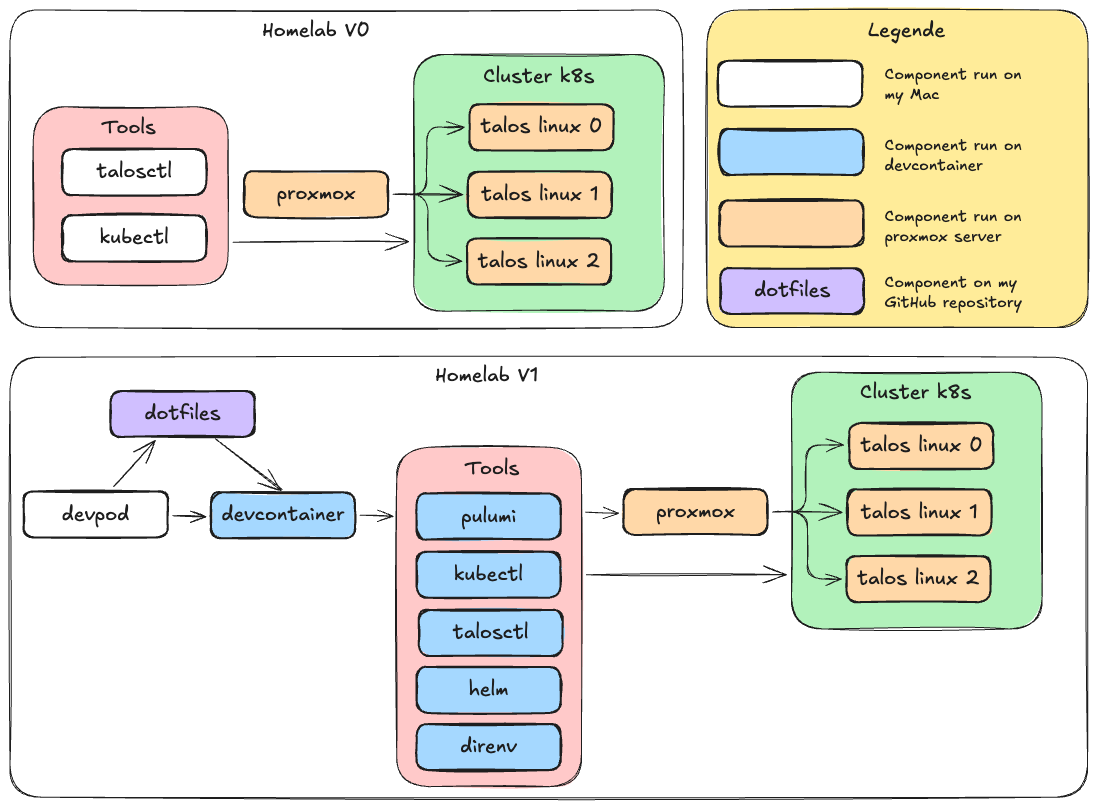
The image below shows the evolution of his homelab, from an early “primitive” setup to the cleaner and far more manageable version he uses today.
In the first architecture, every single tool needed to manage the Kubernetes cluster was installed directly on his Mac. Talosctl, kubectl, and the rest all lived locally. This meant he had to watch tool versions carefully, reinstall things when something broke, and stay constantly alert to prevent configuration conflicts. Nothing was isolated, nothing was reproducible, and the smallest change could corrupt the whole environment. It worked… but it wasn’t stable, and it certainly wasn’t enjoyable.
What Changed in Homelab V1
In the new version, the Proxmox base remains exactly the same—but everything above it has been transformed.
IaC for the Proxmox Layer
He now uses Infrastructure-as-Code to create, reset, or delete VMs on the Proxmox server. This single change makes the entire homelab reproducible. Rebuilding a cluster isn’t a painful manual task anymore; it takes minutes. The whole infrastructure is declared, version-controlled, and easy to rebuild from scratch at any time.
Devcontainer Workflow: The Game Changer
The biggest improvement is how he handles his tools. On his Mac, only DevPod and Docker are installed—nothing more. All the heavy tools (Pulumi, kubectl, helm, talosctl, direnv…) now live inside the devcontainer, isolated and perfectly managed.
This workflow feels incredibly clean. If something happens to his workstation, he can simply clone the repository, launch the devcontainer, and instantly recover the exact same environment, with the exact same tools, ready to work. No reinstalling. No version conflicts. No headaches.
It finally feels clean, predictable, and professional—the kind of setup that makes a homelab enjoyable instead of exhausting.
With this new setup it’s more clear for me and very clean. No dependency hell.
Conclusion
My new workflow is more complexe and elaborate then the previews one, but in the long run I will definitly be a gain of time and energy. I will not use a lot of thinking to setup new project or use previews one who I completlet forget about it. So, right now it’s little bit hard to understand and use, but with practice it will become a second nature.