The Goal: A Reproducible Server
The worst kind of infrastructure is a server that nobody fully understands anymore. Things were installed over time, configuration changed in place, and the mental model of how it all fits together lives only in the memory of whoever last touched it. If that server dies, rebuilding it requires archaeology.
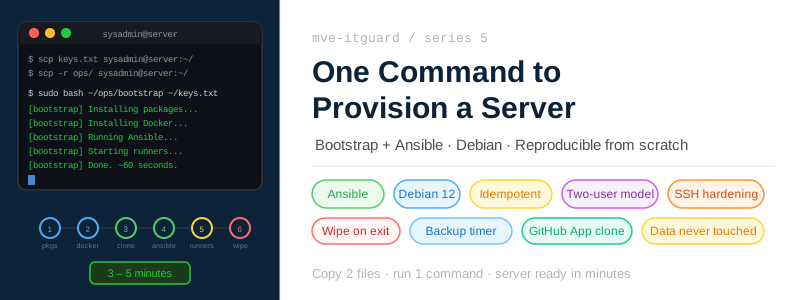
The goal for mve-itguard was the opposite: a fresh Debian machine should go from zero to fully operational — users created, Docker installed, runners running, services ready to deploy — with a single command that anyone with the repository and the AGE key can run.
sudo bash ~/ops/bootstrap ~/keys.txt
That is the entire bootstrap. Three to five minutes on a fresh machine.
Two Phases
There are two distinct phases to setting up the system.
Phase 1 — repository setup happens once, on a developer machine. It involves creating the AGE key, setting up the GitHub App, encrypting all credentials, and committing everything to the repository. The result is a repository that is entirely self-contained: everything needed to provision a new server is already there, encrypted.
Phase 2 — server bootstrap runs on each new server. It pulls those encrypted credentials from the repository, configures the machine, and starts the runners. Because Phase 1 already captured everything, Phase 2 only requires two inputs: the AGE private key and the ops/ directory from the repository.
This separation is deliberate. Phase 1 is done once and its outputs are durable. Phase 2 is repeatable — run it again after an OS reinstall, on a second machine, or after a disaster recovery scenario, and you get the same result.
Phase 1: Everything Encrypted in the Repository
Before a server can be bootstrapped, the repository needs to contain all the credentials it will need — encrypted.
The key items to set up:
The AGE private key is generated once with age-keygen. The public key goes into all four .sops.yaml files across the repository. The private key is stored securely on the developer machine, in the GitHub Actions secret SOPS_AGE_KEY, and — after bootstrap — at /etc/sops/age/keys.txt on the server.
The GitHub App is used by runners to authenticate to GitHub. It needs two permissions: repository contents (read/write, for committing rotated keys) and self-hosted runners (read/write, for registration). The private key for the App is encrypted and stored at ops/github-app-key.b64.pem.enc. This is what makes bootstrap self-contained — the script can clone the private repository without any second credential being copied to the server.
Runner environment files (ci.env.enc, deploy.env.enc, rotate.env.enc, common.env.enc) contain the runner names, labels, and GitHub App credentials. All encrypted with the AGE key.
Infrastructure credentials (ops/credentials.env.enc) store the sysadmin password, Home Assistant credentials, and server hostname. These are not used by automation — they exist for human operators who need to connect.
App secrets (app/security.env.enc) contain the Cloudflare tunnel token, RTSP camera password, and MQTT host. Decrypted by the deploy runner on every deployment.
Once Phase 1 is done, the repository is the complete operational record of the system. Anyone with the AGE key and repository access can reproduce the entire setup on any machine.
Phase 2: Copy Two Things, Run One Command
Bootstrapping a server requires copying exactly two things from the developer machine:
scp ~/.config/sops/age/keys.txt sysadmin@<server>:~/keys.txt
scp -r ops/ sysadmin@<server>:~/ops/
The ops/ directory contains the bootstrap script and ops/github-app-key.b64.pem.enc. The AGE key is what decrypts that file and everything else.
Then, on the server:
sudo bash ~/ops/bootstrap ~/keys.txt
What Bootstrap Does
The script runs nine steps in sequence. Every step builds on the previous one.
Step 1 — System packages
apt-get install -y git curl openssl jq ansible
The minimal set of tools needed to proceed. ansible is installed here because the Ansible playbook runs later in the same script.
Step 2 — sops and age
SOPS and age are not in the standard Debian repositories. They are pulled directly from their upstream GitHub releases:
curl -fsSL "https://github.com/getsops/sops/releases/download/v3.12.2/sops-v3.12.2.linux.amd64" \
    -o /usr/local/bin/sops
chmod +x /usr/local/bin/sops
Both are installed to /usr/local/bin where they are available system-wide.
Step 3 — Decrypt the GitHub App key
This is the critical step that makes Phase 2 self-contained:
APP_KEY_B64=$(sops --decrypt --input-type binary --output-type binary ops/github-app-key.b64.pem.enc)
APP_PEM=$(printf '%s' "$APP_KEY_B64" | base64 -d)
The GitHub App private key is decrypted in memory — it is never written to disk. From this point on, the script can authenticate to GitHub.
Step 4 — Docker
Installed via the official Docker apt repository. The same version that runs in production, from the same source used by all Docker installations on Debian.
Step 5 — Clone the repository
The script uses the GitHub App key to generate a JWT, exchanges it for an installation token, and clones the private repository:
REPO_URL="https://x-access-token:${INSTALLATION_TOKEN}@github.com/MVE-Prod/mve-itguard.git"
git clone "$REPO_URL" /opt/mve-itguard
The installation token is short-lived (one hour) and scoped to repository access only. It is not stored anywhere after the clone.
Step 6 — Ansible
With the repository now on disk, Ansible runs the main playbook:
ansible-playbook infrastructure/ansible/main.yaml \
    -i infrastructure/ansible/inventory/local-inventory.yaml
The playbook runs locally (connection: local) and handles the bulk of the configuration. Four task groups:
Users — creates the mve-itguard service account (UID 1001, docker group, no sudo) and grants sysadmin passwordless sudo:
- name: Create mve-itguard user
  user:
    name: mve-itguard
    uid: 1001
    group: mve-itguard
    shell: /bin/bash

- name: Grant sysadmin passwordless sudo
  copy:
    dest: /etc/sudoers.d/sysadmin
    content: "sysadmin ALL=(ALL) NOPASSWD: ALL\n"
    validate: visudo -cf %s
Directories — creates the runner workspace at /opt/mve-itguard-work (owned by UID 1001, required for DooD path matching) and all persistent data directories under /opt/mve-itguard/app/data/.
Backup timer — installs a systemd service and timer that runs ops/backup daily at 03:00 with a random 30-minute jitter:
[Timer]
OnCalendar=*-*-* 03:00:00
RandomizedDelaySec=1800
Persistent=true
SSH hardening — disables root login via a drop-in configuration file:
# /etc/ssh/sshd_config.d/99-hardening.conf
PermitRootLogin no
Step 7 — Repository ownership
chown -R mve-itguard:mve-itguard /opt/mve-itguard
The service account owns everything it needs to operate. The deploy runner runs as UID 1001:1001 — matching mve-itguard — and inherits access to the workspace.
Step 8 — Start runners
Runner env files are decrypted into plaintext, the runner containers are built and started, then the plaintext files are immediately wiped:
sops -d --input-type dotenv --output-type dotenv common.env.enc > common.env
sops -d --input-type dotenv --output-type dotenv ci.env.enc > ci.env
# ... same for deploy.env and rotate.env

docker compose -f infrastructure/gh-self-hosted-runner/docker-compose.yaml up -d --build

rm -f common.env ci.env deploy.env rotate.env
The plaintext env files exist on disk for approximately the time it takes for docker compose up to read them — a few seconds at most.
Step 9 — Install the AGE key and clean up
install -m 600 -o root -g root "$AGE_KEY_PATH" /etc/sops/age/keys.txt
rm -f "$AGE_KEY_PATH"
The AGE key is moved from the temporary location the operator copied it to (~/keys.txt) to its permanent, root-only location at /etc/sops/age/keys.txt. Then the original is deleted.
After this step, the key exists only in one place on the server: a file owned by root with mode 600, in a directory that only root can enter. The runner-rotate container mounts that directory directly.
The User Model
Ansible creates exactly two relevant users:
| User | UID | Groups | sudo | Purpose |
|---|---|---|---|---|
sysadmin | 1000 | sudo | NOPASSWD | SSH entry point, human operators |
mve-itguard | 1001 | docker | None | Service account, owns app files |
sysadmin is the human-facing account. It has full passwordless sudo for maintenance tasks. SSH access is key-based only — password authentication is not disabled but the system was designed expecting a key.
mve-itguard has no sudo. It can run Docker commands (via the docker group) but cannot escalate to root. This is the account the deploy runner runs as, the account that owns /opt/mve-itguard, and the account that owns the persistent data directories.
The separation matters: even if the deploy runner were compromised, it runs as mve-itguard and cannot gain root access.
Idempotent by Design
Bootstrap is safe to re-run. All apt-get install calls use --no-install-recommends and are guarded with command -v checks for tools like sops and age. The Ansible tasks use declarative state (state: present, state: directory) that Ansible resolves without side effects if the resource already exists.
The persistent data at /opt/mve-itguard/app/data/ is never touched. Home Assistant history, Frigate recordings, Zigbee2MQTT state — none of it is affected by re-running bootstrap. The data directories are created by Ansible only if they do not exist, and the CI/CD pipeline is designed to never modify them.
Re-bootstrapping an existing server after an OS reinstall follows the same two-step process: copy two files, run one command.
What This Achieves
The practical result is that the server is not special. It runs Debian. It has the right users, the right directories, and the right services configured. If it fails, a replacement can be provisioned in minutes. The operational knowledge is in the repository and in the AGE key — not locked in the state of a specific machine.
That is the property that matters most for a home server. Not high availability, not zero-downtime deploys, but the confidence that a hardware failure or a botched OS upgrade is a minor inconvenience rather than a crisis.
Next in this series: Automated AGE Key Rotation in CI — how the pipeline detects a changed encryption key and re-encrypts all secrets automatically on every push.